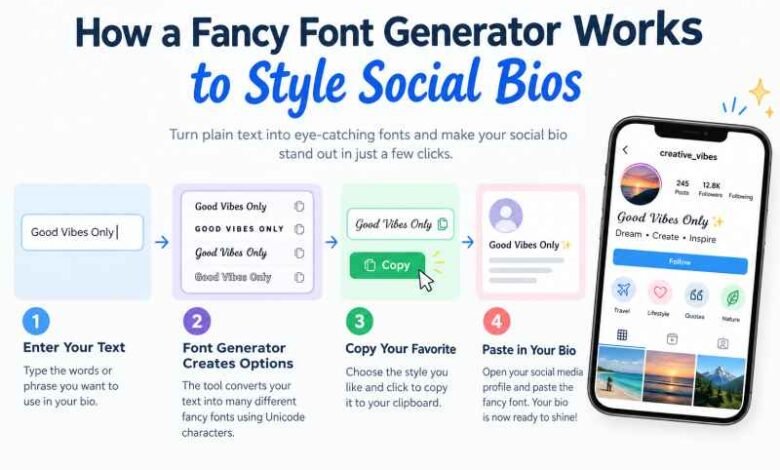
A fancy font generator works by swapping standard keyboard characters with unique mathematical or decorative symbols from the universal Unicode standard. This conversion allows you to paste stylized text into social media bios, gaming profiles, and chat boxes that otherwise block custom typography.
Here is the thing. You have probably seen an Instagram bio that looks incredibly distinct, using script or bold gothic lettering to break up the monotonous default typeface. When you paste your phrase into a tool like Fonts Generator X, it instantly applies a translation layer to your text.
Let us say you type the word “Hello” into the browser input box. The tool references a built-in character map and instantly switches your standard letters into specialized alternatives like 𝐇𝐞𝐥𝐥𝐨 or ℋℯ𝓁𝓁ℴ.
How Do These Stylized Characters Actually Work?
Every modern smartphone, computer, and web browser relies on a massive shared dictionary called Unicode. Back in 2001, international software regulators added roughly 1,000 unique letter-like symbols to this catalog. They did this so scientists, chemists, and mathematicians could write complex equations inside digital text documents without needing to upload raw image files.
Years later, social media managers discovered these mathematical blocks. When you input a capital letter H, a tool like Fonts Generator X searches its lookup table, identifies the bold serif twin character mapped at the technical code position U+1D407, and returns it to your screen. The site covers 26 lowercase letters, 26 capital letters, and 10 numeric digits across 132 distinct visual arrangements.
[ Your Standard Input ]  --->  [ Unicode Lookup Table ]  --->  [ Stylized Output Text ]
       "Hello"                     Maps to Math Blocks             𝐇  𝐞  𝐥  𝐥  𝐨
Real Font Files vs. Unicode Text Changers
A lot of online guides completely mess this up by treating actual typography files and text converters as the same product. They are not. If you download a standard TrueType Font (
.ttf) or OpenType Font (.otf) file to your desktop computer, it only alters how text displays inside your local programs.If you write a message in a custom downloaded font file and email it to your cousin, they will only see standard Arial or Calibri text unless they also have that exact font file installed on their own hard drive.
Unicode symbols change the genetic structure of the text itself. The visual layout travels directly inside the characters. Because of this structural permanence, anyone viewing your digital channel reads the exact same script you intended.
Here is a quick look at how these two approaches compare across everyday web platforms:
| Feature Criteria | Downloaded Font File (.ttf / .otf) |
Unicode Text Characters |
|---|---|---|
| Primary Mechanism | Alters local application rendering | Substitutes individual character blocks |
| Audience Visibility | Only visible on your local machine | Visible to every user on any device |
| Social Media Compatibility | Strictly blocked in bio fields | Allowed in almost all standard bios |
| Accessibility Compliance | Screen readers speak text normally | Screen readers read symbols as math code |
| Installation Requirement | Manual software download needed | Instant copy-and-paste action |
Where Can You Paste These Stylish Layouts?
Almost any internet input box accepts these adjusted characters without throwing a major system error. However, mobile apps establish strict barriers when separating generic presentation fields from searchable indexing databases.
Instagram Profile Rules
Your main 150-character bio box and primary profile Name field accept these customized adjustments easily. A travel blogger might format their subtitle lines to read 𝓣𝓻𝓪𝓿𝓮𝓵 · 𝓒𝓸𝓯𝓯𝓮𝓮 · 𝓒𝓪𝓶𝓮𝓻𝓪𝓼 to separate themselves from an endless grid of standard accounts.
Your foundational
@username is a completely different story. Instagram explicitly restricts handles to traditional lowercase letters, numbers, underscores, and single periods.- Allowed: Bio text, Name field, captions, story overlays, video comments.
- Blocked: Main account
@usernamehandle.
TikTok Feed Constraints
TikTok allows you to use these characters inside your 80-character profile description and your 30-character top display name. Many creators utilize Small Caps formatting here because the clean lettering stays highly legible even when compressed into tiny notification feeds.
But be careful before saving changes. TikTok locks your primary display name modification privileges for 7 full days following an update, so double-check your spelling before committing.
- Allowed: Main display name, bio area, video captions, live comments.
- Blocked: Handle registration field.
Discord Server Customization
Discord provides the most flexible playground for custom text layouts. You can inject these styles across your 32-character display name, 128-character custom status updates, 190-character About Me sections, and public chat windows.
Server administrators frequently use symbols like ┆・general-chat to build highly clean, categorized channel rosters. A quick word of caution: automated community moderation bots often flag chaotic Zalgo glitch styles as malicious spam, which can get your messages instantly purged.
- Allowed: Server nicknames, text channels, about cards, status bubbles.
- Caution: Highly distorted glitch text might trigger spam filters.
Facebook Page Headline Formatting
Facebook personal profiles, public page descriptions, timeline comments, and Messenger windows let you paste these characters without a struggle. Local businesses often use a bold serif title line like 𝗡𝗲𝘄 𝗺𝗲𝗻𝘂 𝘀𝘁𝗮𝗿𝘁𝘀 𝗙𝗿𝗶𝗱𝗮𝘆 to give a text-heavy post an actual journalistic headline.
Do not try this on your legal personal profile name, though. Facebook active filters block symbols, numbers, and unapproved accent marks, and an accidental violation can lock your editing capabilities for 60 days.
- Allowed: Wall posts, business introductions, community groups, chat messages.
- Blocked: Personal profile identity registration fields.
Competitive Gaming Layout Constraints
Every individual video game operates on a proprietary structural framework. PUBG Mobile restricts global nicknames to 14 total characters, meaning a complex decorative frame like 乂 name 乂 eats up 4 precious slots before you even type a single letter of your handle.
Free Fire accepts various historical symbols but rejects others without providing a helpful explanation. It is always smart to keep two backup styles ready in a scratchpad file.
- Allowed: Clan titles, Steam community tags, casual lobby handles.
- Check: Strict character counting limits vary heavily between studios.
Why Do Some Phones Show Blank Boxes or Question Marks?
Have you ever looked at a profile layout and seen an ugly empty box (□) or a question mark inside a diamond? Web designers call these broken elements “tofu.” They appear because the phone reading the text does not have a local font catalog containing that specific Unicode symbol.
[ Styled Character: 𓆩 ] ---> [ Reader's Old Device ] ---> [ Missing Glyph Error ] ---> Outputs: [ □ ]
Unicode updates its universal dictionary every year. Budget Android devices or older gaming consoles running operating systems from four years ago do not get these patches.
While an ancient Egyptian hieroglyphic wing symbol like 𓆩 might break on older budget hardware, standard math modifications like Bold, Italic, and Cursive remain highly stable across almost all platforms.
Best Practices for Content Creators and Brand Profiles
If you operate a commercial business or build an online brand profile, look-alike characters can cause unforeseen issues if you misuse them. Keep your most critical operational details in standard plain text.
If you convert an analytical phone number into a styled layout like 𝟎𝟑𝟎𝟎-𝟏𝟐𝟑𝟒𝟓𝟔𝟕, modern smartphones will fail to read it as an active numeric string. This means your customer loses the ability to tap your profile to start an instant phone call.
The same restriction applies to business emails and physical maps. Style the bold introductory label, like 𝐁𝐨𝐨𝐤𝐢𝐧𝐠𝐬:, and keep the actionable detail plain.
For regular social posting, use a single emoji alongside your custom text to form a clean bulleted directory. A combination like 📍 𝘓𝘢𝘩𝘰𝘳𝘦 · 📷 𝘍𝘰𝘰𝘥 𝘴𝘵𝘰𝘳𝘪𝘦𝘴 keeps your design organized.
Do not overload your lines with decorative characters. Screen reading software built for visually impaired audiences cannot interpret these symbols as regular alphabet text. A screen reader will voice the word 𝐇𝐞𝐥𝐥𝐨 as “Mathematical Bold Capital H, Mathematical Bold Small E,” which ruins the user experience for those individuals. Keep your main searchable keywords in standard format.
Troubleshooting Technical Formatting Issues
If you use a built-in mobile web browser wrapped inside an app like Instagram or TikTok, the quick “Copy” button on web pages can sometimes lock up. These internal browsers block clipboard access for safety reasons.
To fix this, tap the three-dot option menu in the top corner of your screen and select “Open in external browser” to relaunch the tool in Chrome or Safari.
Are your character counts behaving strangely? Certain complex mathematical characters count as two separate bytes behind the scenes.
A 15-letter title formatted in heavy serif characters might read as 30 characters to a strict social media limit box. If you run out of space, try switching over to the Small Caps filter, which almost always tracks at a clean one-to-one character ratio.
FAQ Section
Why do some fancy font X show up as boxes or question marks?
The device reading your text does not have that specific character mapped inside its internal software system. This happens frequently on older Android devices, smart TVs, or game consoles that have not received an operating system update in years. Stick to standard Bold, Italic, or Cursive options if you want to ensure your text displays accurately for all readers.
Why won’t Instagram or TikTok save my username in a fancy font?
Core usernames handle global tagging, search queries, and database indexing, which requires them to remain completely uniform. Both platforms restrict handle strings exclusively to lowercase letters, standard numbers, underscores, and periods. Keep your specialized styles confined to your display name or public bio fields instead.
Are copy-and-paste fonts safe to use on personal devices?
Yes, they are completely safe to use across any website or messaging platform. They are simple text characters belonging to the global Unicode dictionary, meaning they cannot contain secret tracking pixels or malicious software code. The main issue to consider is readability, as search tools and screen readers cannot read these symbols properly.
Do fancy fonts work identically on both iPhone and Android?
Yes, provided that both devices have been updated to a modern software version from the last few years. Because Apple and Google both sync their device software with the global Unicode framework, standard stylistic adjustments will translate cleanly across both ecosystems. Gaps only appear when using highly obscure historical symbols or complex boundary brackets.
Conclusion
When using stylized text layouts, moderation is everything. Keep your critical business details, email links, and searchable names in a standard format so your audience can easily read and locate your profile, reserving these unique text styling tricks purely for brief, eye-catching hooks.